Verdict
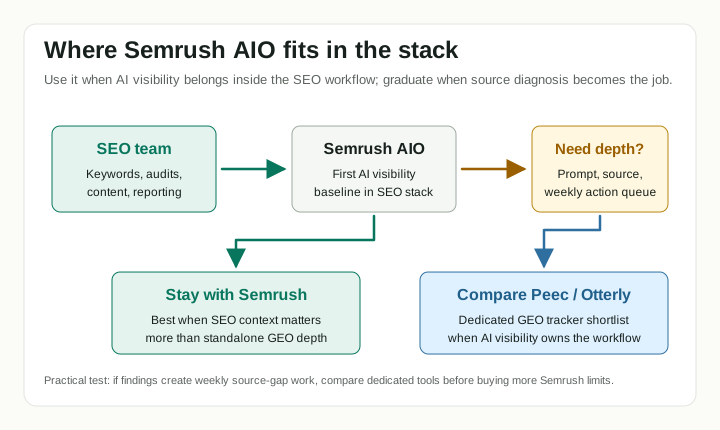
Semrush AI Visibility Toolkit is a practical first step if your team already lives in Semrush. It gives SEO teams a familiar way to see whether AI answers mention your brand, which competitors appear, which prompts and topics matter, and whether technical blockers might keep AI crawlers away from your site.
That is useful. It is also not the same as a dedicated ecommerce GEO system. Semrush is strongest when AI visibility is an extension of SEO. Dedicated tools pull ahead when AI search becomes its own operating rhythm: prompt design, source analysis, citation gaps, product-page fixes, third-party mentions, and weekly action planning.
This is a researched review, not a live-account test. The score reflects buyer fit for small-to-mid-market ecommerce and DTC teams, not Semrush’s overall SEO platform strength.
What Semrush AI Visibility Toolkit Does
Semrush’s AI visibility layer sits on top of the SEO platform rather than behaving like a separate startup tracker. The public docs frame it around five jobs:
- Benchmark brand visibility across AI search surfaces.
- Analyze brand performance, share of voice, sentiment, and narrative drivers.
- Research prompts and topics that shape AI answers.
- Track selected prompts over time.
- Audit site health for AI search and crawler access issues.
For an ecommerce SEO team, the main appeal is context. A standalone AI tracker may tell you that ChatGPT, Perplexity, Gemini, or Google’s AI surfaces mention a competitor. Semrush can put that next to keyword, domain, backlink, site audit, and reporting workflows your team may already use.
The official feature page says Semrush connects traditional search and AI visibility, including brand recommendations, competitor benchmarking, prompt research, AI Overview visibility, AI traffic estimates, reporting widgets, and AI-readiness site audit checks. The public AI Visibility Toolkit knowledge base lists Brand Performance, Prompt Research, Prompt Tracking, and AI Search Site Audit as the core toolkit pieces.
Pricing and Total Cost
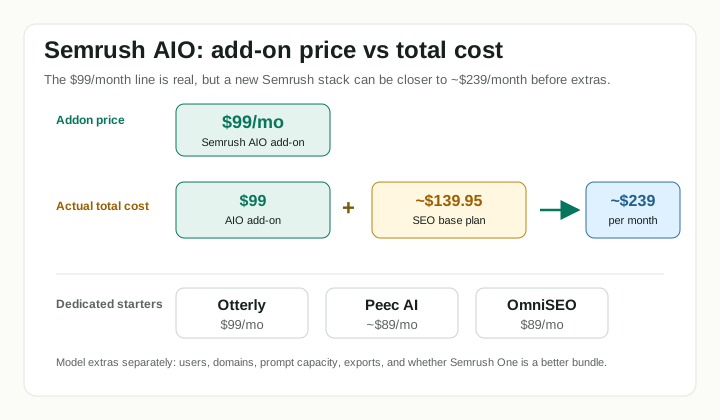
The headline price is simple. Semrush lists the AI Visibility Toolkit at $99 per month. Its knowledge base says the add-on includes one folder, one domain for Brand Performance analysis, 25 prompts for Prompt Tracking, 300 daily queries in AI Analysis reports, 1,000 daily queries in Prompt Research, AI Search Checks for up to 100 pages, and 10 daily CSV exports.
The buyer problem is not the $99 line item. It is the total cost stack.
| Cost item | Public signal | Buyer read |
|---|---|---|
| AI Visibility Toolkit | $99/month | Clear entry add-on price. |
| SEO Toolkit base plan | From $139.95/month in Semrush’s feature guide | Often relevant because the AI add-on is most useful beside Semrush SEO workflows. |
| Semrush One | From $199/month in Semrush’s feature guide and blog | Bundled SEO + AI route with higher prompt and keyword limits. |
| Extra Brand Performance domain | $99/domain/month | Important for agencies or multi-brand ecommerce groups. |
| Extra prompts | $60/month for 50 more prompts | The 25-prompt entry limit can be tight for more than one product category. |
| Extra user access | Additional users start at $45/month for SEO Toolkit access; AI Visibility Toolkit access is a separate $99/user/month license in Semrush’s user-management KB | Team use can change the economics quickly, especially when teammates need AI Visibility reports rather than only shared SEO access. |
That makes the realistic question: are you buying a small add-on to an existing Semrush habit, or are you buying Semrush mainly to get AI visibility? The AI Visibility Toolkit can be bought as its own Semrush toolkit, so the choice is not simply “pay for the SEO suite or skip it.” Still, the product is most useful when the buyer also wants Semrush’s SEO context. If you already pay for Semrush, the add-on is a low-friction test. If you do not, the comparison should include the standalone AI Visibility Toolkit, Semrush One, and dedicated AI visibility tools.
For a one-store Shopify or DTC team, 25 tracked prompts can be enough for a serious first baseline around one category. It is not enough for every product line, region, competitor set, and funnel stage. Start with the prompts that map to money: category discovery, comparison intent, branded trust, and post-purchase policy questions.
What We Like
The best thing about Semrush is that it does not force SEO teams to invent a new dashboard habit. AI visibility sits beside the workflows many teams already run: keyword research, competitor analysis, site audit, position tracking, reporting, and content planning.
That matters for ecommerce because AI visibility work usually turns into ordinary execution:
| AI visibility signal | Ecommerce action |
|---|---|
| A competitor is mentioned more often | Improve comparison pages, category pages, and third-party proof. |
| AI answers cite weak or stale pages | Refresh product facts, reviews, warranty details, and buying advice. |
| AI Overview visibility changes for SEO keywords | Reprioritize content where Google is answering more of the query itself. |
| AI crawlers may be blocked | Fix robots, CDN, firewall, and technical access issues before writing more content. |
| A topic appears in prompt research | Decide whether it deserves owned content, earned media, or no action. |
Semrush also has a clear pricing page and unusually detailed usage-limit documentation for this young category. That is better than opaque demo-only pricing when a small ecommerce team is trying to budget.
What We Don’t Like
The main weakness is that Semrush is not ecommerce-native. It can help a store understand AI visibility, but it does not think in SKUs, product feeds, margin, merchant listings, reviews, or revenue attribution by default.
The second weakness is scaling. The $99 add-on looks inexpensive until you add another domain, another user, or another block of prompts. Agencies and multi-brand ecommerce teams should model the cost before treating it as the obvious default.
The third weakness is workflow depth. Semrush can surface prompts, competitors, sentiment, citations, and recommendations, but a dedicated AI visibility tool may give a better operating layer once prompt and source work becomes weekly. For example, source-gap analysis, persona-specific prompt sets, client-level reporting, and action prioritization may be easier in a tool built only for GEO/AEO.
Finally, engine coverage and limits should be checked before purchase. Semrush’s current public docs mention different AI surfaces across modules, including ChatGPT, Google AI Overviews, Google AI Mode, Gemini, and Perplexity. The task brief also lists Copilot. Treat coverage as plan- and module-specific, not a permanent blanket promise.
Semrush vs Dedicated AI Tools
The key decision is not “does Semrush have AI visibility?” It does. The better question is whether AI visibility should be an SEO add-on or a dedicated workflow.
| Decision point | Semrush AI Visibility Toolkit | Otterly.AI | Peec AI | OmniSEO |
|---|---|---|---|---|
| Best buyer | Existing Semrush SEO team | Small team trying paid monitoring | Growing team that needs competitor and source diagnostics | Team evaluating a more dedicated GEO/AEO workflow |
| Starting motion | Add to Semrush, buy the standalone toolkit, or buy Semrush One | Standalone tracker | Standalone tracker | Standalone workflow to verify |
| Main strength | SEO context, keyword/audit/reporting adjacency | Low-friction monitoring | Prompt, competitor, and citation diagnosis | Dedicated AI-search positioning |
| Ecommerce fit | Useful for SEO-led DTC teams, not store-native | Good first paid baseline | Better for recurring prompt/source work | Depends on current feature depth and pricing |
| Prompt depth | Entry add-on lists 25 tracked prompts | Plan-dependent | Public tiers emphasize prompt quotas | Verify directly |
| Best when | You already trust Semrush and want one stack | You need a cheaper first tracker | You can act on source gaps every week | You want a purpose-built GEO tool instead of an SEO-suite add-on |
| Main risk | Add-on economics and limited ecommerce specificity | Can stay too lightweight | Still requires human execution | Public evidence may be thinner or changing quickly |
If Semrush is already your SEO command center, start there. If you are choosing from a blank slate and AI visibility is the only job, compare it against dedicated tools before paying for a broader SEO suite.
Profound’s Review and Conflict Caveat
Profound has published its own review of Semrush’s AI Visibility Toolkit. It is useful because it discusses real workflow trade-offs, but it is not neutral: Profound sells a competing AI visibility platform.
The fairest way to read that review is as a competitive teardown. Profound’s article argues that Semrush is better for smaller companies that need basic AI monitoring alongside SEO, while dedicated tools are stronger when teams need deeper data and actionability. That distinction is directionally reasonable, but any comparison from a direct competitor should be weighted accordingly.
Our view is similar in shape but narrower for ecommerce: Semrush is a sensible first add-on for SEO-led teams, especially existing customers. It becomes less attractive when the buyer needs ecommerce-native tracking, multi-domain agency economics, or a dedicated weekly GEO operating system.
Who Should Use It
Use Semrush AI Visibility Toolkit if:
- Your SEO, content, or agency workflow already runs in Semrush.
- You want AI visibility next to keyword, domain, competitor, and audit data.
- You need a researched starting point before funding a larger GEO stack.
- One domain and 25 tracked prompts are enough for the first baseline.
- Your team can turn findings into content, technical, review, and outreach work.
For ecommerce, the best initial setup is one product category, three to five real competitors, and 20 to 25 prompts from a real buying journey. Do not start by tracking every possible category. Start where a visibility gap could change content priorities this month.
Who Should Skip It
Skip or delay Semrush AI Visibility Toolkit if:
- You are not already a Semrush user and only need AI visibility tracking.
- You need SKU-level or product-feed-level AI search visibility.
- You need broad prompt coverage across many regions, clients, or product lines.
- You want a tool that turns citation gaps into a detailed action queue.
- You need hands-on support, consultative strategy, or enterprise governance.
A small store should usually start with a manual prompt sheet, a free visibility check, or a low-cost standalone tracker before building a full Semrush budget around AI search. A larger team should compare Semrush One, the AI add-on, and dedicated tools using the same prompt set before committing.
Ecommerce Setup I Would Run First
For a DTC brand selling premium cookware, I would not start with 100 prompts. I would build one focused baseline:
| Setup item | Example |
|---|---|
| Domain | The main DTC storefront |
| Competitors | Two direct DTC brands, one Amazon/private-label option, one publisher or review site |
| Prompt set | 20 to 25 prompts around “best nonstick pan”, “safe cookware”, comparisons, warranty, and trust |
| Engines | Start with the AI surfaces Semrush supports for your plan and market |
| Review cadence | Weekly for Brand Performance, daily for tracked prompts where available |
Then I would sort the output into three buckets:
- Owned fixes: product pages, category pages, comparison pages, FAQ, schema, crawl access.
- Earned proof: third-party reviews, buying guides, YouTube, Reddit, and niche publishers.
- Measurement limits: prompts, engines, countries, users, and domains that exceed the current plan.
That keeps Semrush honest. If the findings create useful work, keep the add-on or upgrade the package. If the findings are too shallow, move to a dedicated AI visibility tool before spending more on limits.
Sources Checked
- Semrush AI Visibility Toolkit pricing
- Semrush AI Visibility Toolkit knowledge base
- Semrush features for AI visibility
- Semrush best AI visibility tools roundup
- Profound review of Semrush AI Visibility Toolkit (competitor source; read with conflict-of-interest caveat)
Comments